Work tickets
On this page
- Ticket list
- Ticket editor
- Alap információk (Basic information)
- Munkajegy részletes konfigurációja (Ticket details)
- Munkafolyamatok, Komponensek, Mellékletek (Acting works, components, attachments)
- Bottom bar
- What technicians see
- Statuses
- Notifications and client e-mails
- Ticket names
- Calendar
- Printouts
- Invoices
- Related pages
A work ticket (munkajegy) records one job from intake to completion: who the client is, what product or service it is about, what is wrong, who works on it, what was used and done, how it is delivered, and in which status it is. Tickets belong to a workspace.
Menu: Adminisztráció → Munkajegyek (Work tickets). The menu item is shown when the licence includes the workTicketManagement feature.
Ticket list#
At the top: the current workspace with Változtatás (Change), Naptár nézet (Calendar view) and Új munkajegy létrehozása (Create new work ticket, ticket admins only).
Filters
- Státusz (Status): one or more statuses. When Archiválva (Archived) is the only selected status, two date fields appear to filter archived tickets by their last modification date.
- Keresés (Search): searches the ticket name, the additional factory identifier, the client's name, e-mail and phone number, and the guarantor's additional identifier.
- Garanciát viselő (Guarantor).
- Munkát végző felhasználók/csoportok (Assigned users/groups).
Columns: Név (Name), Státusz, Ügyfél neve (Client), Munka típus (Work type), Munkajegy típus (Ticket type), Létrehozva (Created), Módosítva (Modified). Click a column header to sort; the default order is newest first. Hover over a time to see the exact date and the user. A row turns red when the ticket has not changed for the period set in the background job settings (5 days by default).
Row actions
- Munkajegy módosítása (Edit): opens the editor.
- Klónozás (Clone, ticket admins): opens a new ticket pre-filled with this ticket's data, in the current or another workspace you choose. The name gets the suffix - Másolat (copy). Attachments are not copied, and nothing is saved until you save the new ticket.
- Munkajegy törlése (Delete, ticket admins): asks for confirmation and cannot be undone. A ticket that has invoices cannot be deleted.
Ticket admins and workspace admins see every ticket of the workspace; other users see only the tickets assigned to them or to their groups.
Ticket editor#
The header buttons are Vissza a munkajegyekhez (Back to tickets), Összesítés nézet (Summary view), Számlák (Invoices, only with Számlázz.hu turned on) and Felvételi nézet (Intake view, only when the intake sheet is enabled in App configuration). The page has three columns.
Alap információk (Basic information)#
- Munkajegy neve / azonosítója (Ticket name / identifier), required, unique within the workspace. See Ticket names.
- Probléma leírása (Problem description) and Leírás (Description, further notes).
- Ügyfél információk (Client information): click Kiválaszt (Select) to pick an existing client, or type the client's details: name, activity (Aktív/Inaktív), e-mail, website, phone, postcode, city, address, tax number (format XXXXXXXX-X-XX), notes. If the client does not exist yet, it is created when the ticket is saved. Who may change an existing client's details from a ticket is described on Permissions and roles.
Munkajegy részletes konfigurációja (Ticket details)#
- Munkajegy típusa (Ticket type), Munka típusa (Work type, with a Jogi információ button that shows the work type's legal text), Garanciát viselő (Guarantor) and its additional identifier (for example a warranty case number). All three types are required.
- Munkajegy státusza (Status), see Statuses.
- Munkát végző felhasználók/csoportok (Users/groups doing the work): the assignees. They are notified about status and assignment changes, and technicians can only work on tickets assigned to them.
- Gyártó/Szolgáltató → Gyártói/Szolgáltatói termék csoport → Termék típus (Manufacturer → product group → product type), chosen in this order.
- További Gyári/Szolgáltatási azonosító/szám (Additional factory identifier, for example a serial number). The list button next to it shows all tickets of the workspace with the same identifier, which helps to find the earlier repairs of the same device.
- Vásárlás időpontja (Purchase date), Felvétel időpontja (Intake date), További tartozékok (Accessories handed over, as tags).
- Kiszállítási beállítás (Delivery): Beállít (Set) adds one delivery route with a planned date (UTC), net and gross price, and whether the company or a third party delivers.
- Értesítési beállítások (Notification settings): Felvesz (Add) adds a notification channel. A ticket can use application-level channels and the channels of its own workspace that you can read.
Munkafolyamatok, Komponensek, Mellékletek (Acting works, components, attachments)#
- Munkafolyamatok (Acting works): Hozzáad (Add) picks a work step from the acting works list. Its default price can be overridden for this ticket (Munkafolyamat költség módosítás), with a required reason.
- Komponensek (Components): Hozzáad picks a component and a quantity (Szükséges mennyiség). The price can be overridden in the same way (Komponens költség módosítás).
- Mellékletek (Attachments): Fájltároló shows the file storage of the ticket, Kiválaszt/Változtat chooses it. Fájlok kiválasztása (Choose files) works once the ticket has been saved with a file storage; the files are uploaded when you save. A file whose name already exists on the ticket is skipped. If you change the file storage later, earlier attachments stay in the old storage and remain downloadable; new uploads go to the new one.
Stock. Components on a ticket are taken from the warehouse when the ticket is saved. Removing a component, or lowering its quantity, returns the difference to stock. If there is not enough in stock, the save is refused and nothing changes. Deleting a ticket returns all of its components to stock, by the same rule; if the deletion is refused (for example because the ticket has invoices), the stock does not change.
Bottom bar#
- Törlés (Delete), or Eldob (Discard) on a new ticket.
- Késés értesítés küldése (Send delay notification): sends the client an e-mail that the job is delayed. Not available in closed statuses (Elkészült, Kiszállítás alatt, Kiszállítva, Archiválva, Visszavonva, Selejtezés). Each sent e-mail appears on Ügyfél Email Események.
- Munkajegy létrehozása / Munkajegy módosítása (Create / Save).
If you leave the editor with unsaved changes, the browser asks whether to discard them.
What technicians see#
A technician (workspace role Technikus) opens only tickets assigned to them or their group, and most fields are read-only. They can change the status, the assignees, acting works and components, upload attachments and send the delay e-mail.
Statuses#
| Status (Hungarian) | Meaning |
|---|---|
| Új | New |
| Ajánlat kiadva, válaszra vár | Quote issued, waiting for an answer |
| Ajánlat elfogadva, javításra vár | Quote accepted, waiting for repair |
| Ajánlat visszautasítva, javítás nélkül kiadható | Quote rejected, can be returned unrepaired |
| Folyamatban | In progress |
| Folyamatban - Késés | In progress, delayed |
| Alkatrész nem beszerezhető, nem javítható | Part not available, cannot be repaired |
| Ügyfél nem elérhető | Client not reachable |
| Ügyfél beszállítja | Client brings it in |
| Alkatrészre vár | Waiting for parts |
| Alkatrész megérkezett, javításra vár | Part arrived, waiting for repair |
| Csereut./készülékre vár | Replacement: waiting for device |
| Csereut./készülék kiadható | Replacement: device can be handed over |
| Beüzemelés | Commissioning |
| Elbírálásra vár | Waiting for review |
| Számlázandó | To be invoiced |
| Elkészült | Done |
| Kiszállításra vár | Waiting for delivery |
| Kiszállítás alatt | Being delivered |
| Kiszállítva | Delivered |
| Tartozás | Debt |
| Selejtezés, nem javítható | Scrapped, not repairable |
| Archiválva | Archived |
| Visszavonva | Withdrawn |
The status filter and the editor use these labels; the Státusz column of the list shows the last two as Archivált and Visszavont.
The three delivery statuses can be chosen only when the ticket has a delivery. Elkészült, Kiszállítás alatt, Kiszállítva, Archiválva, Visszavonva and Selejtezés count as closed: no delay e-mail can be sent and no inactivity reminder is sent for them. Tickets are never archived automatically.
Notifications and client e-mails#
| Event | Who is informed | How |
|---|---|---|
| Ticket created | The client (if an e-mail address is given) | E-mail Ticket Registration Confirmation |
| Ticket created with assignees, or assignees changed | Old and new assignees (group members included) and the workspace admins | The ticket's notification channels |
| Status changed | Assignees and workspace admins | The ticket's notification channels |
| Saved while Kiszállítás alatt | The client | E-mail Delivery / Presence information with prices |
| Késés értesítés küldése clicked | The client | E-mail Ticket Delay |
| No change for 5 days (configurable) on an open ticket | Assignees and workspace admins | E-mail reminder from the background job |
E-mails to clients go through the SMTP server configured in appsettings.json. A client e-mail that cannot be sent (for example because no sender address is configured) never blocks the save: the ticket is saved, the e-mail is skipped, and a warning is written to the log. Sent e-mails are listed on Ügyfél Email Események (Audit and logs). A ticket without notification channels sends no notifications to users. See Notifications and Client-facing flows.
Ticket names#
The name field is filled in automatically for a new ticket: the company identifier from Cégadatok (if set) followed by a unique code. You can overwrite it. Names must be unique within a workspace.
If App Konfiguráció → Munkajegy → Klasszikus név azonosító generálás (classic name generation) is on, the field cannot be edited and the server generates the name as identifier - running number - year (for example 01-09-999999-00042-2026), or running number - year without a company identifier.
Calendar#
Naptár nézet shows the tickets of the current workspace on the day they were created, in a month or week view. The colour of an entry follows the status; a red title marks a ticket that has not changed for a while. Click an entry to open the ticket. Vissza a listanézetre returns to the list.
Printouts#
Both printouts open in the browser and are printed with Nyomtat (Print).
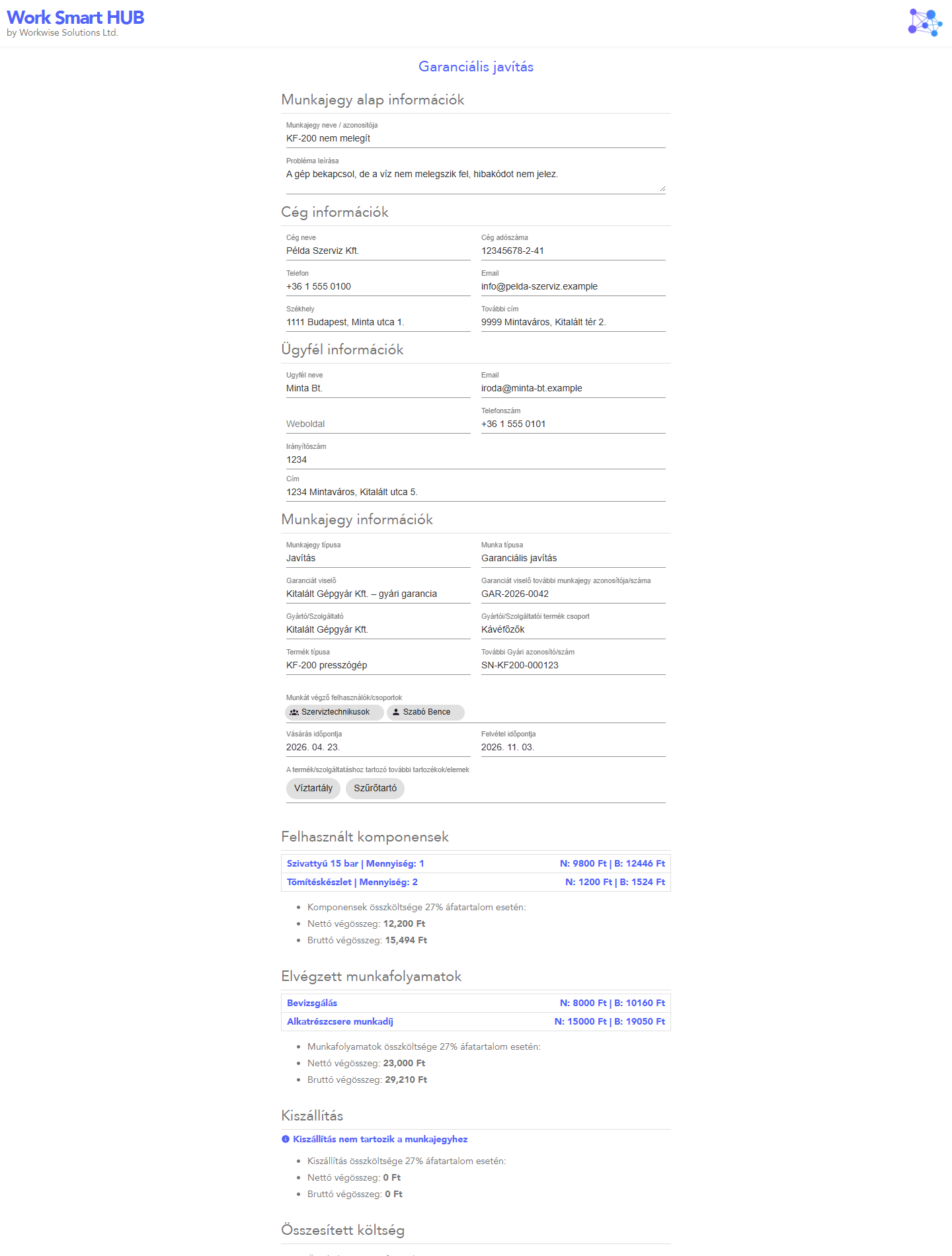
Összesítés nézet (Summary view, ticket admins): the work type and its legal reference, the ticket, company, client and product data, other tickets with the same factory identifier, accessories, the components, acting works and delivery with net and gross amounts, the total cost, the invoices (if any), the work type's legal text, a date and signature lines.
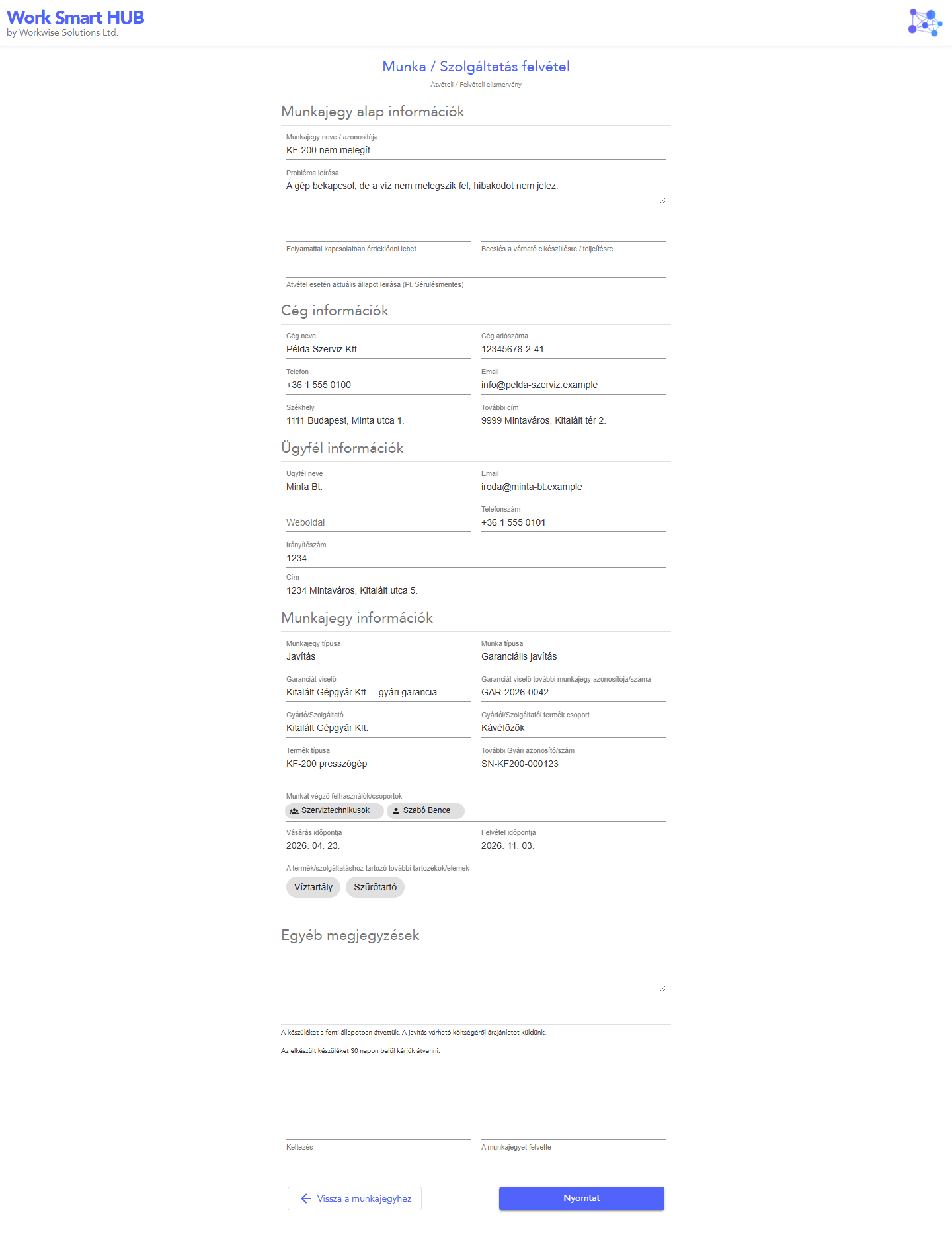
Felvételi nézet (Intake view, Munka / Szolgáltatás felvétel, ticket admins): an intake acknowledgement for the client. It is available when App Konfiguráció → Szolgáltatás felvételi lap is enabled, and prints the texts set there. Before printing you can fill in free-text fields (where to ask about progress, estimated completion, condition at intake, other notes); these are not saved.
| Summary | Intake acknowledgement |
|---|---|
 |
 |
Invoices#
With Számlázz.hu invoicing turned on, ticket admins see a Számlák button on the ticket to issue and manage its invoices. If automatic invoicing is on, a ticket admin who moves the ticket into Számlázandó issues its final invoice automatically.